
Photo by Ellie Burgin from Pexels
You signed up for a free trial, forgot about it, and three months later discovered recurring charges on your credit card. Sound familiar? Auto-renewal clauses are one of the most common, and most costly, traps hidden inside SaaS privacy policies and terms of service. This guide breaks down the exact warning signs you should look for, gives you a practical checklist to protect yourself, and shows how automated tools can do the heavy lifting for you.
TL;DR
- Auto-renewal clauses let SaaS vendors charge you indefinitely unless you take action to cancel before a specific deadline.
- Warning signs include vague cancellation windows, buried renewal language, price-increase provisions, and no refund after renewal.
- Many jurisdictions now require clear disclosure and easy cancellation, but enforcement is inconsistent.
- A pre-signup review of the terms, even a five-minute scan, can save you hundreds of dollars a year.
- Tools like the free Terms Doctor browser extension flag auto-renewal red flags automatically so you don't have to read every paragraph.
Why auto-renewal clauses matter more than you think

Auto-renewal (sometimes called "continuous billing" or "negative-option renewal") means your subscription renews at the end of each billing cycle, monthly, quarterly, or annually, unless you explicitly opt out. On the surface, it sounds convenient: you keep using the tool without interruption. In practice, it creates three problems for SaaS buyers:
- Silent upgrades to paid tiers. A free trial converts to a paid plan the moment the trial window closes. If the terms don't send a reminder email, you may not notice until the charge appears.
- Price escalation. Some agreements reserve the right to increase the renewal price with as little as a single email notification, or even just a notice posted on the company's website.
- Difficult cancellation. Cancellation may require a phone call during business hours, a written letter, or navigating a deliberately confusing settings page. The harder it is to cancel, the more renewals the vendor collects.
"Companies having these clauses in their contracts increase a customer's LTV by up to 200%.">, Terms for Subscriptions, Auto
That statistic alone explains why auto-renewal language is so prevalent. It is not necessarily malicious, many legitimate SaaS companies use it, but the way the clause is written and disclosed makes all the difference between a fair deal and a consumer trap.
Key takeaway: Auto-renewal is not inherently bad, but vague or buried renewal language is a reliable red flag that the vendor prioritizes revenue retention over transparency.
The 7 biggest red flags in auto-renewal clauses

Not every auto-renewal clause is created equal. Below are the seven patterns that should make you pause before clicking "I agree."
- No explicit mention of auto-renewal on the sign-up page. If the renewal terms only appear deep inside a linked document and not on the checkout screen, the vendor is counting on you not reading them.
- Cancellation deadline shorter than 30 days. Some terms require you to cancel 7 or even 3 days before the renewal date. Miss that window by a single day and you owe another full cycle.
- No pro-rated refund after renewal. Look for phrases like "all fees are non-refundable" immediately following the renewal section. This means once the charge fires, your money is gone regardless of whether you use the service.
- Right to change pricing without affirmative consent. Clauses that say "we may update pricing at any time; continued use constitutes acceptance" give the vendor a blank check to raise your rate.
- Cancellation requires contacting support rather than self-service. If the terms say "to cancel, email support@…" instead of providing an in-app button, expect delays and upsell pressure.
- Automatic upgrade from free to paid. Trial-to-paid conversion without a separate payment confirmation step is one of the most complained-about practices in SaaS billing.
- Bundled consent with data-sharing provisions. Some privacy policies tie your billing agreement to broad data-sharing permissions, meaning cancelling the subscription doesn't necessarily stop data collection.
How to review auto-renewal terms before you sign up
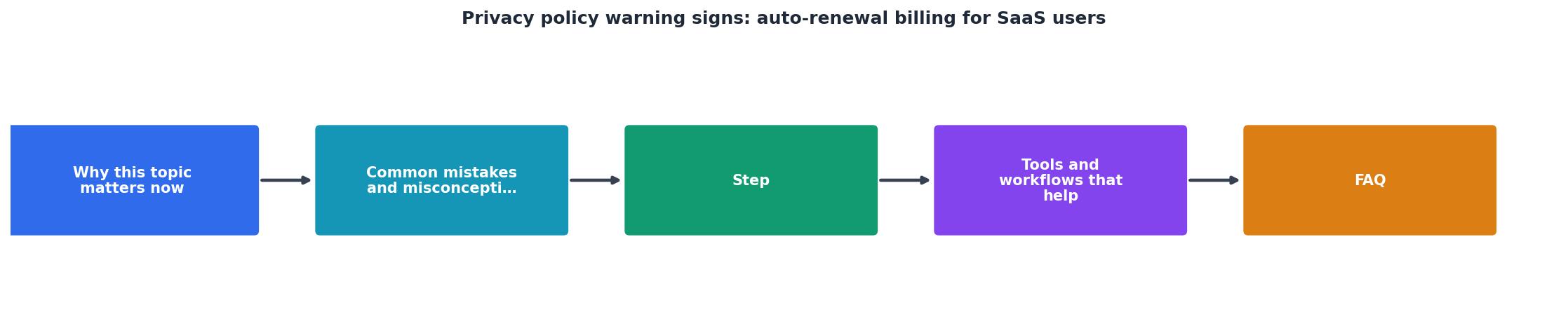
Follow this step-by-step process every time you evaluate a new SaaS tool. It takes less than ten minutes and can save you from unwanted charges down the road.
Step 1, Locate the terms page
Go to the vendor's website footer and look for links labeled "Terms of Service," "Terms of Use," "Subscription Agreement," or "Billing Terms." Some vendors split billing terms into a separate document, so check for that too.
Step 2, Search for renewal language
Use Ctrl + F (or Cmd + F on Mac) and search for keywords: renew, automatic, recurring, billing cycle, cancel, refund. Jump to each match and read the surrounding paragraph.
Step 3, Identify the cancellation window
Note exactly how many days before the renewal date you must cancel. Write this date in your calendar with a reminder set at least one week earlier.
Step 4, Check for price-change provisions
Look for language about the vendor's right to modify fees. Acceptable terms will say something like "we will notify you at least 30 days in advance and you may cancel before the new price takes effect." Unacceptable terms simply state "prices may change at any time."
Step 5, Confirm the refund policy
Determine whether you can get a full or pro-rated refund if you cancel after a renewal charge. If the terms say "no refunds," factor that into your decision.
Step 6, Run an automated check
Install the free Terms Doctor extension for Chrome, Edge, Brave, Opera, or Vivaldi. Navigate to the vendor's website and let Terms Doctor automatically find the terms page, run its 101 consumer-protection checks, and give you an A-F grade. The extension highlights auto-renewal red flags in plain language so you can make an informed decision in seconds rather than minutes.
Your pre-signup auto-renewal checklist
Auto-Renewal Protection Checklist
Your progress is saved automatically in your browser.
What the law says about auto-renewal disclosures

Several jurisdictions have enacted laws specifically targeting auto-renewal practices. While this article is not legal advice, understanding the regulatory landscape helps you know your rights.
United States
California's Automatic Renewal Law (ARL) requires businesses to present auto-renewal terms "clearly and conspicuously" before the purchase, obtain affirmative consent, and provide an easy online cancellation mechanism. The FTC has also taken enforcement actions against companies that make cancellation unreasonably difficult, most notably through its proposed "click-to-cancel" rule that would require sellers to make cancellation as easy as sign-up.
European Union
Under EU consumer protection directives, traders must inform consumers about the total cost per billing period, the conditions for terminating the contract, and the minimum duration of obligations. The right of withdrawal gives consumers 14 days to cancel most online purchases, though ongoing subscriptions after the withdrawal period are governed by the specific contract terms and national implementations.
United Kingdom
The Consumer Rights Act 2015 and the Consumer Contracts Regulations require clear pre-contract information about recurring payments. The Competition and Markets Authority (CMA) has specifically investigated subscription traps and published guidance urging businesses to make cancellation straightforward.
Practical implication
Even with these protections, enforcement is reactive, regulators typically act after complaints pile up. Your best defense is proactive review before you hand over your payment details. Automated tools like Terms Doctor help bridge the gap between what the law requires and what vendors actually do.
Real-world scenarios: when auto-renewal goes wrong
To make these warning signs concrete, consider three common scenarios SaaS buyers encounter:
Scenario 1, The forgotten annual plan. You sign up for a project management tool on an annual plan at a discounted rate. Eleven months later, the tool charges your card for another full year at a higher "standard" rate. The terms allowed a price increase with 15 days' email notice, but the email landed in your spam folder. Because the terms state "all fees are non-refundable," you are stuck paying for a tool you no longer use.
Scenario 2, The trial-to-paid conversion. A design platform offers a 14-day free trial that requires a credit card. On day 15, it charges you for a monthly Pro plan. The sign-up page mentioned the trial in small text, but the auto-renewal disclosure was only in the linked terms document. You didn't receive a reminder email because the terms only promised "commercially reasonable efforts" to notify you.
Scenario 3, The cancellation maze. You decide to cancel a CRM subscription. The settings page has no cancel button. The terms say you must "submit a cancellation request to the billing department." You email them, receive an auto-reply promising a response within 5 business days, and meanwhile the renewal date passes. The next charge appears on your statement before anyone responds.
Each of these scenarios could have been avoided, or at least anticipated, by reviewing the auto-renewal clause before signing up and setting appropriate calendar reminders.
How Terms Doctor helps you spot auto-renewal traps
Terms Doctor is a free browser extension available for Chrome, Edge, Brave, Opera, and Vivaldi. When you visit any website, it automatically locates the terms of service and privacy policy, then runs 101 consumer-protection checks, including specific checks for auto-renewal language, cancellation difficulty, refund restrictions, and price-change provisions.
The extension assigns an A-F grade to each terms page and highlights individual red flags in plain language. For auto-renewal specifically, Terms Doctor looks for:
- Whether the terms disclose automatic renewal clearly
- The length of the cancellation window
- Whether cancellation is self-service or requires contacting support
- Refund availability after a renewal charge
- Price-change notification requirements
Note: Terms Doctor's automated checks are informational and do not constitute legal advice. For specific legal questions about a contract, consult a qualified attorney.
Frequently Asked Questions
Additional Resources
- Terms for Subscriptions, Auto-Renewals and Payments - Most people assume privacy data laws don't have a connection with auto-renewal and subscription clauses.
- Subscriptions, Auto-Renewals, and Payments Clauses - An auto-renewals clause is used to let users know what your billing terms are when it comes to auto-renewals and when they can expect their ...
- What is Auto-renewal? | Sage Advice US - Auto-renewals allow customers to effortlessly continue their subscription services without service interruption. The auto-renewal terms are typically agreed ...